








Today, we will be discussing how to jailbreak iOS 26 using XIXtract. The arrival of a new iOS version always sparks a familiar question in the community: “Is there a jailbreak yet?” With iOS 26 now on devices, the hunt for the next generation of tweaks, themes, and system modifications is officially on. While the dream of a full, kernel-level jailbreak remains on the horizon, a tool called XIXtract has emerged as a compelling and accessible alternative, promising a “jailbreak-like experience” directly from your browser.
But is XIXtract the real deal, or just a placeholder? This comprehensive guide dives deep into the iOS 26 jailbreak scene. We’ll explore what XIXtract can and cannot do, provide a step-by-step installation guide, discuss essential safety precautions, and look at the future of jailbreaking on Apple’s latest operating system. Whether you’re a seasoned jailbreaker or a curious newcomer, read on to understand your options for customizing iOS 26.
Understanding the iOS 26 Jailbreak Landscape
As of now, there is no public, full, or kernel-level jailbreak for iOS 26. Established tools like Unc0ver, Checkra1n, Dopamine, and Palera1n are currently incompatible with Apple’s newest OS, as detailed in resources like the ReiBoot guide. These tools, which provide deep system access, rely on finding and exploiting specific vulnerabilities in iOS. Each new Apple update patches these holes, forcing developers into a constant cat-and-mouse game.
This is where XIXtract enters the picture. It’s not a traditional jailbreak, but rather a web-based customization platform designed specifically for iOS 26. Instead of exploiting the system kernel, it uses a legitimate Apple technology: configuration profiles. This approach allows users to install third-party apps, themes, and even package managers like a limited version of Cydia, all without ever needing a computer or sideloading IPA files. For many, it currently offers the closest and safest taste of a jailbroken device on iOS 26.
What is XIXtract? A Jailbreak Alternative, Not a Jailbreak
Before diving in, it’s crucial to understand what XIXtract is and, more importantly, what it is not.
According to its official website, xixtract.com, XIXtract is a “new and safe way to enjoy jailbreak-level customization.” It operates entirely through Safari and utilizes Apple Web Config profiles. This method is inherently safer than traditional jailbreaks because it doesn’t modify system files, exploit security vulnerabilities, or risk bricking your device.
What XIXtract Can Do:
- Install custom themes and icon packs.
- Add and browse repositories (using
.xixfiles) for third-party apps. - Install a simulated version of Cydia and other package managers.
- Sideload certain apps and tweaks that operate at the user level.
- Offer all these features without a computer, directly from your iPhone or iPad.
What XIXtract Cannot Do (Key Limitations):
- It is not a kernel-level jailbreak. It does not provide root access to the system.
- It cannot run advanced system-level tweaks that require deep integration (e.g., call recording, system-wide theming engines like SnowBoard, or deep file system modifications).
- It relies on configuration profiles, which are inherently more limited than a true jailbreak’s substrate or tweak injection methods.
- The “Cydia” available through XIXtract is a limited, profile-based version, not the full package manager found in traditional jailbreaks.
In essence, XIXtract is an excellent gateway drug for customization. It lets you personalize your iOS 26 device and explore a world of third-party apps and themes with minimal risk, but it won’t turn your iPhone into the fully customizable powerhouse that a tool like Palera1n or Dopamine offers on older, supported iOS versions.
Prerequisites: What You Need to Know Before You Start
Even with a “safer” tool like XIXtract, preparation is key. The first rule of any modification, as emphasized by the ReiBoot guide, is to protect your data.
- Backup Your iPhone: This is non-negotiable. Before installing any profiles or third-party apps, create a complete backup of your device. You can use iCloud, a Finder (on macOS Catalina and later), or iTunes (on older macOS or PC). A backup is your safety net. If something goes wrong or you simply want to revert, you can restore your device to its previous state.
- Ensure Compatibility:
- iOS Version: Your device must be running iOS 26 or 26.0.1.
- Device: XIXtract supports all iPhone models that run iOS 26, including the latest iPhone 17, 16, and 15 series.
- Browser: You must use Safari. The profile installation process is designed to work through Apple’s native browser.
- Enable a Passcode: Your device needs an active passcode to install configuration profiles. This is a standard iOS security requirement.
- Manage Expectations: Understand that XIXtract is a customization tool, not a full jailbreak. It will not give you the same level of control as tools for older iOS versions, and many popular, advanced tweaks will not work.
Step-by-Step Guide: Installing and Using XIXtract on iOS 26
Ready to get started? Follow this guide to unlock a new layer of customization on your iPhone.
Part 1: Installing the XIXtract Profile
- Open Safari on your iOS 26 device and navigate to the official XIXtract website.
- Tap the “Download XIXtract” button. You’ll be prompted to download a configuration profile. Allow this.
- Open the Settings app on your iPhone.
- Go to General > VPN & Device Management.
- Under the “Downloaded Profile” section, tap on the XIXtract profile.
- Tap “Install” in the top-right corner. You may need to enter your device passcode.
- Follow the on-screen prompts and confirm the installation. Once complete, the XIXtract app icon will appear on your home screen.
Part 2: Adding Repositories (The .xix Files)
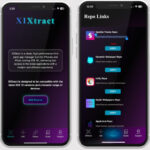
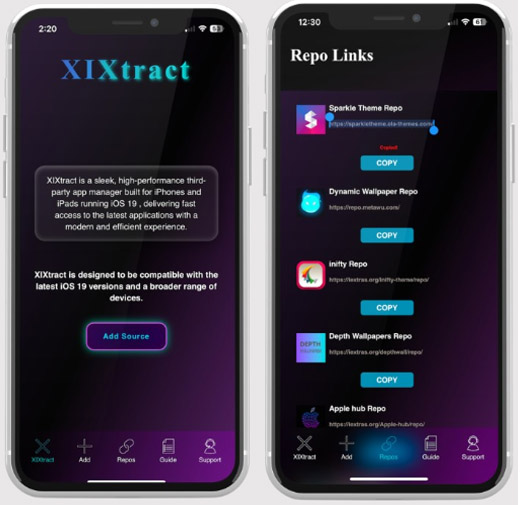
XIXtract uses a repository system based on .xix files. Think of these as curated lists of apps and themes. You can add them in a few ways:
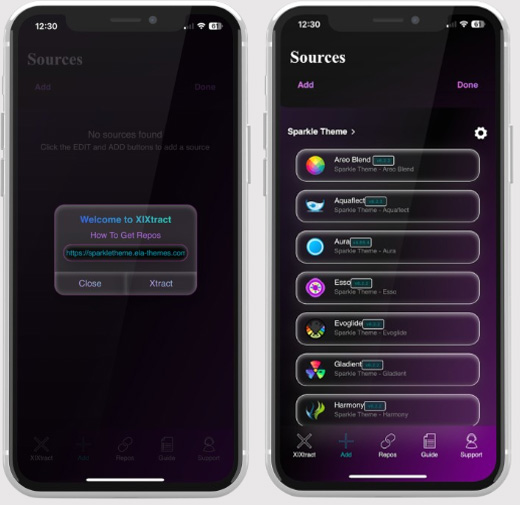
- Method 1: From the XIXtract Repos Tab
- Launch the XIXtract app and go to the “Repos” tab.
- Tap “Browse .xix Files” or visit the pre-configured repository pages listed on the site.
- Select the
.xixfiles you want, and they will be automatically imported.
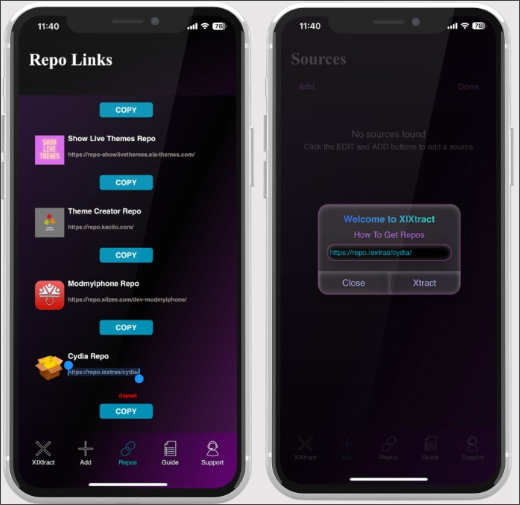
- Method 2: Add a Custom Repo URL
- In the Repos tab, find the option to “Add Source” .
- Paste a repository URL you’ve found online (often from theme developers or app lists). The app will fetch and add it.
Part 3: Installing Apps and Themes
- Once your repositories are added, go to the “Apps” tab within the XIXtract app. You’ll see a list of available software.
- Browse or search for an app or theme you like and tap on its card to see details.
- Tap the “Download” button. For first-time or free users, this might prompt a one-time donation to support the platform.
- The file will be downloaded. You’ll need to go to the Files app to locate it (likely in your Downloads folder). Tap the file and follow the on-screen instructions.
- Just like with the initial XIXtract install, many apps will require you to install an additional configuration profile. Go back to Settings > General > VPN & Device Management to install and trust the new profile for that specific app.
The Risks: Why Caution is Still Advised
While XIXtract is marketed as “risk-free,” no third-party modification is without potential downsides. The ReiBoot guide rightly points out the general risks of jailbreaking, and some apply here too:
- Security & Privacy: Installing configuration profiles from unknown sources always carries a risk. A malicious profile could potentially redirect your traffic or access certain data. Only add repositories and install profiles from trusted sources.
- System Instability: While you can’t brick your device with a profile, installing numerous low-quality or poorly made tweaks and apps can lead to app crashes, battery drain, or general UI sluggishness.
- App Detection: Some apps, particularly banking and certain games, are becoming increasingly sophisticated at detecting any form of modification, including installed profiles. They may refuse to run on a device with third-party profiles.
- No Security Updates (Indirectly): Installing profiles does not block OTA (Over-the-Air) updates from Apple. However, updating to a new iOS version (e.g., 26.1) will likely remove all installed profiles and apps from XIXtract, forcing you to wait for the tool to be updated.
Top Traditional Jailbreak Tools to Watch
For those holding out for the real thing, it’s worth keeping an eye on the development of established jailbreak tools. While they don’t support iOS 26 yet, their developers are the most likely to release a future update. The ReiBoot guide provides an excellent overview of the top contenders:
- Palera1n: Based on the powerful checkm8 hardware exploit, this tool supports A9-A11 devices (iPhone X and earlier). It’s a prime candidate for future iOS 26 support on these older, but still capable, devices.
- Dopamine: A modern, rootless jailbreak for A12-A15 devices running iOS 15.0-16.6.1. Its architecture is modern and could potentially be adapted for future iOS versions.
- Unc0ver & Checkra1n: These are legendary names in the community. While their active development has slowed, they remain benchmarks for what a full-featured jailbreak should offer.
Jailbreak Tool Comparison for iOS 26
| Jailbreak Tool | Typical iOS Support | Device Compatibility | iOS 26 Support Status |
|---|---|---|---|
| Unc0ver | iOS 11.0 – 14.3 | A8 – A13 | ❌ Not supported |
| Checkra1n | iOS 12.0 – 14.8.1 | A7 – A11 (iPhone X & earlier) | ❌ Not supported |
| Dopamine | iOS 15.0 – 16.6.1 | A12 – A15 | ❌ Not supported |
| Palera1n | iOS 15.0 – 17.3 | A9 – A11 (iPhone X & earlier) | ❌ Not supported |
| XIXtract | iOS 26, 26.0.1 | All devices on iOS 26 | ✅ Works Now (as alt.) |
Troubleshooting Common XIXtract Issues
Encountering a problem? Here are some quick fixes for common issues, drawn from both the official XIXtract guide and general iOS wisdom.
- Profile Won’t Install: Ensure you’re using Safari, have a stable internet connection, and have a device passcode enabled. Try restarting your device or clearing your Safari cache and history.
- XIXtract App or Downloaded Apps Won’t Open: The most common cause is that the profile wasn’t trusted. Double-check in Settings > General > VPN & Device Management that the profile for that specific app is marked as “Verified” or “Trusted.” A simple device restart can also resolve the issue.
- XIXtract Website Not Loading: Disable any content blockers or VPNs you have active in Safari. Try refreshing the page or attempting the installation again later.
- If Your Device Gets Stuck: While rare with profile-based installs, things can sometimes go wrong. If your iPhone is acting up, freezing, or stuck in a boot loop, don’t panic. Connect it to a computer and use a system repair tool like Tenorshare ReiBoot. Its “Standard Repair” mode can often fix these issues without erasing your data, getting your device back to a stable state.
The Future: What’s Next for iOS 26 Jailbreak?
The release of iOS 26 marks the beginning, not the end, of the jailbreak journey. History shows that the earliest versions of a new iOS are often the most vulnerable. Developers are already hard at work analyzing iOS 26’s security.
Tools like XIXtract are likely to evolve, perhaps offering more sophisticated tweaks within the profile-based framework. Meanwhile, the jailbreak community will be watching for any kernel exploits that could pave the way for a new version of Palera1n, Dopamine, or a completely new tool.
For now, staying on the earliest possible version of iOS 26 (like 26.0) is the best strategy if your ultimate goal is a full jailbreak. Once you update, you can’t go back, and a future exploit might only work on the initial release.
Conclusion: Is XIXtract Worth It on iOS 26?
So, is XIXtract the iOS 26 jailbreak we’ve been waiting for? No, not in the traditional sense. It is not a kernel-level exploit that unlocks the entire system. However, it is a fantastic, safe, and accessible alternative for users who want to personalize their iPhones and explore a world beyond the App Store.
XIXtract delivers on its promise of a “jailbreak-like experience” without the high risks of bricking or complex computer-based procedures. It’s perfect for beginners dipping their toes into customization or for veterans who want some basic theming and third-party apps while waiting for a full jailbreak to drop.
If you’re on iOS 26 and feeling the itch to customize, XIXtract is currently the best and safest game in town. Just remember to back up your data, stick to trusted repositories, and enjoy the process of making your iPhone truly your own.
0 Comments
Be the first to comment.