











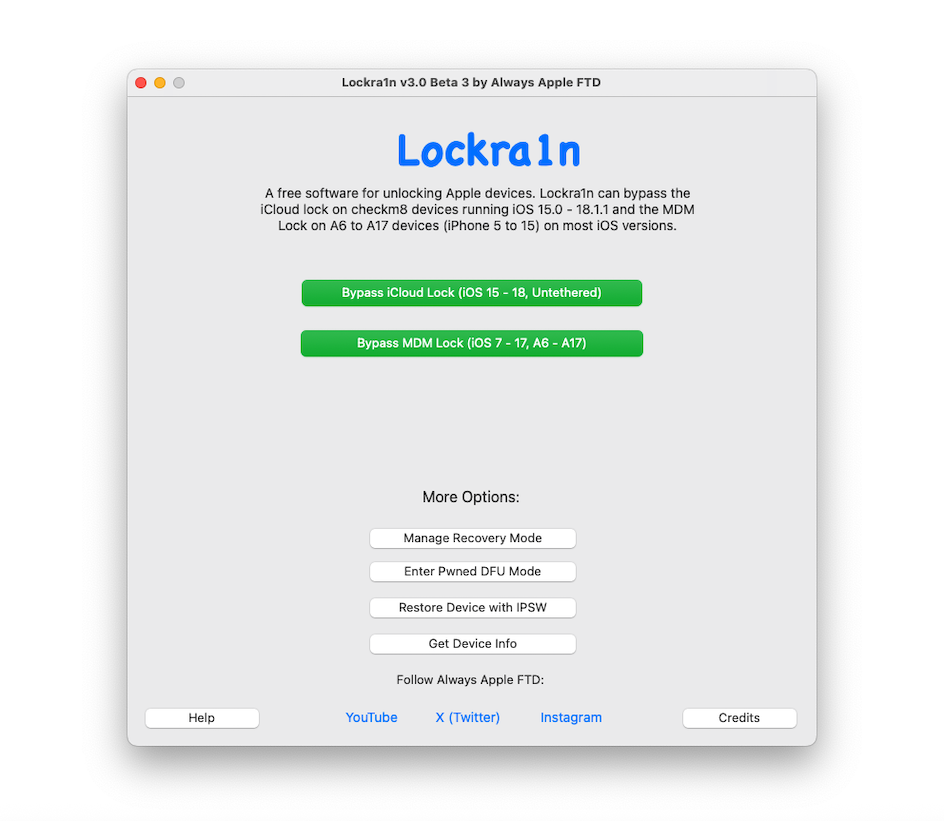
Bypassing iCloud hasn’t always been and easy task. If you are thinking about bypassing iCloud on that old iDevice, then Lockra1n, a free Untethered iCloud Bypass tool for iOS 15.x to 18.x is what you will be needing.
iCloud Activation Lock remains one of the most formidable barriers put in place by Apple on their different iDevices. Designed to deter theft, it can also turn a legitimate second-hand device into an expensive paperweight if the original owner cannot be reached. For years, solutions to this problem have been scarce, expensive, or technically complex.
Enter Lockra1n, a free macOS tool developed by a solo developer known as Always Apple FTD. Since its initial release, Lockra1n has evolved significantly, offering an untethered iCloud bypass for a wide range of “checkm8“-vulnerable devices, from the iPhone 6s to the iPhone X. With its latest updates in 2026, it’s worth taking a fresh look at what this tool offers, how it works, and—most importantly—its very real limitations.
What is Lockra1n?
Lockra1n is a free software utility for macOS that promises to bypass the iCloud Activation Lock on devices powered by Apple A9 through A11 chips . Unlike many paid services that require sending your device away or rely on server-side interventions, Lockra1n operates locally on your Mac. It leverages the infamous checkm8 bootrom exploit—the same unpatchable vulnerability that powers the Checkra1n jailbreak—to gain the deepest possible access to the device .
The developer, Always Apple FTD, positions Lockra1n not as a tool for illicit activity, but as a solution for individuals who have legally purchased a second-hand device that is still tied to a previous owner’s Apple ID, or for repair technicians who need to test hardware on locked devices. The software’s website includes a clear disclaimer: *”Lockra1n IS NOT for unlocking stolen devices. I am not promoting any type unethical hacking and/or unlocking of stolen devices. By using this software, you are agreeing to these terms.”*
What’s New in 2026? Version 2.1 and Beyond
The development of Lockra1n has been active, with significant updates arriving in late 2025 and early 2026. The project’s GitHub releases page details key improvements in the latest v2.1 Beta 1 :
- iPhone X iOS 16 Mounting Issue Fixed: A critical bug that prevented the tool from properly accessing necessary partitions on the iPhone X running iOS 16 has been resolved by integrating the Palera1n ramdisk.
- “Normal Mode” Bypass Option: Previously, devices could only be unlocked via a “ramdisk mode.” The new update introduces a Normal mode bypass function, offering an alternative method. While the developer still recommends the ramdisk mode for stability, this addition provides flexibility for users whose devices may not respond to the primary method.
- Updated User Interface: The GUI has been re-arranged to be more intuitive, making the tool more accessible to non-technical users.
Prior to this, v2.0 Beta 3 marked a major milestone with a complete re-write of the application in Swift, which the developer states makes it “a LOT more secure and stable” . This version also introduced free device registration (a simple process using your device’s serial number) and an untethered iOS 15 bypass, meaning the bypass persists after a reboot—a significant improvement over earlier, tethered methods .
Which Devices and iOS Versions Are Supported?
Lockra1n’s compatibility is defined by the checkm8 exploit. Here is the breakdown based on the official website and community testing .
Supported Devices (A9 to A11)
- iPhone: 6s, 6s Plus, SE (1st gen), 7, 7 Plus, 8, 8 Plus, X.
- iPad: Pro 12.9-inch (2015 & 2017), Pro 10.5-inch, Air (1st & 2nd gen), 5th, 6th, and 7th gen, Mini (4th gen).
Important Note on iPhone X: The official documentation and community guides warn that the iPhone X (especially on iOS 16) can be problematic. The jailbreak step may fail, requiring multiple attempts. Users should be patient and prepared to retry the process if the device boots to the Hello screen without verbose text during the exploit.
Supported iOS Versions
- Officially Supported: iOS 15.0 – 15.X.X, iOS 16.0 – 16.X.X, iOS 17.0 – 17.X.X, iOS 18.0 – 18.1.1 .
- Experimental Support: iOS 13.0 – 14.8.1. The developer notes that devices on these versions may not function fully .
- Not Supported: iOS 12 and any devices with A12 chips or newer (iPhone XS, XR, and all subsequent models) .
How to Use Lockra1n: A Step-by-Step Overview
Using Lockra1n requires a Mac (macOS Mojave 10.14 or newer), a compatible iPhone or iPad, and a USB-A to Lightning cable (USB-C hubs often fail during the DFU process) . Here is a condensed guide based on the official instructions and community tutorials.
Phase 1: Preparation and Registration
- Download and Open Lockra1n: Download the latest version from the official website . If macOS blocks the app from an unidentified developer, right-click the app and select “Open.” If that fails, use the Terminal command
xattr -cr /path/to/Lockra1n.app. - Connect Your Device: Plug your iPhone into your Mac and trust the computer if prompted.
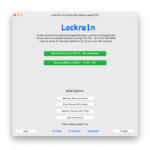
- Prepare the Tool: In the Lockra1n app, select “Bypass iCloud Lock (iOS 15 – 18, Untethered)” and click “Prepare Lockra1n” . This installs necessary scripts. If you get errors, you may need to install Xcode command-line tools (
xcode-select --install) and Homebrew packages (brew install libxml2) via Terminal . - Register Your Device: Click “Bypass Device! (Normal Mode)” . The app will prompt you to register. Visit the provided registration page, enter your iPhone’s serial number (find it by pressing the “i” button on the “Hello” screen), and click “Register Device!” . This is a free, one-time step required to generate activation files .
Phase 2: The Jailbreak (DFU Mode)
This is the most technical step. The iPhone must be placed into DFU (Device Firmware Upgrade) mode. The button sequences differ by model .
- Crucial Warning: The iFixit guide emphasizes that you cannot enter DFU mode with a Mac that only has USB-C ports. You must use an official Apple Lightning to USB-A cable connected directly to a USB-A port or a powered USB-C hub. The process often fails with passive adapters.
- Enter Recovery Mode First: Follow the steps for your device to get to the Recovery Mode screen (computer and cable icon).
- Enter DFU Mode: Once in Recovery, perform the specific button sequence for your device (e.g., for iPhone 8/X: quick press Volume Up, quick press Volume Down, hold Side button for 10 seconds, then continue holding Side button while also holding Volume Down for 5 seconds, then release Side but keep holding Volume Down). A successful DFU mode is indicated by a completely black screen.
- Apply the Jailbreak: In Lockra1n, click “I’ve Entered DFU Mode” . The device will boot and show verbose text. The app may prompt you to briefly unplug and replug the cable. If successful, the device will reboot to the “Hello” screen.
Phase 3: The Bypass
- Once the iPhone is back on the “Hello” screen, click OK in the app. Wait for the device to fully boot and click OK again.
- Lockra1n will now work its magic, patching files and applying filesystem modifications. The iPhone will reboot.
- After the reboot, you should be able to connect to Wi-Fi, skip the activation step, and proceed to the “Data & Privacy” screen. You have successfully bypassed the lock.
The Post-Bypass Reality: What Still Doesn’t Work
This is the most critical section of any article about iCloud bypass tools. It is essential to have realistic expectations. According to detailed community guides on iFixit and other resources , a Lockra1n-bypassed device comes with significant caveats:
- No Cellular Functionality: This is the biggest limitation. The device will not be able to connect to a cellular network. This means no phone calls, no SMS text messages, and no cellular data. The device effectively functions as an iPod touch, relying entirely on Wi-Fi.
- No Passcode on A11 Devices: If you are using an iPhone 8, 8 Plus, or X, you cannot set a passcode. The bypass requires the device’s baseband to be disabled. Setting a passcode will re-enable the baseband, causing the device to re-lock and potentially break the jailbreak . The only fix is to restore the device and start over.
- iCloud Limitations: While you can sign into iCloud for services like iCloud Drive and Find My (after setup), you may experience issues with FaceTime, iMessage, and making purchases . It’s recommended to sign into iCloud from the Settings app after the initial setup, rather than during the setup assistant.
- General Stability: The device may not be 100% stable, and some features may behave unpredictably.
How Lockra1n Works (The Technical Bit)
For the technically curious, Lockra1n is a sophisticated wrapper around several foundational tools :
- checkm8: The hardware-level bootrom exploit that allows for low-level control.
- libimobiledevice: A cross-platform library suite that interfaces with iOS devices (
ideviceinfo,idevicepair). - ipwndfu & gaster: Tools for putting the device into PwnDFU mode.
- sshrd & iproxy: For creating an SSH ramdisk and establishing a connection to run commands and modify the filesystem.
The tool uses these components to patch the files responsible for the activation check, effectively convincing the device that it has been successfully activated, without altering the device’s serial number or baseband. The new “untethered” method requires fewer SSH commands and filesystem modifications than earlier versions, making it more robust .
The Bottom Line
Lockra1n is a remarkable achievement in the world of iOS bypass tools. It is a free, powerful, and increasingly polished utility that democratizes access to a service that would otherwise cost a significant fee.
However, its power is matched by its limitations. It is not a magic bullet that will give you a fully functional iPhone. It is a specialized tool for a specific purpose: gaining access to the iOS interface on a Wi-Fi-only, passcode-restricted device. For a repair technician needing to test a screen or a user trying to reclaim a forgotten iPad as a dedicated media player, Lockra1n is an invaluable resource. For anyone hoping to turn a locked phone into a daily driver with full cellular service, it will be a profound disappointment.
As Always Apple FTD states on the project’s website, “Please don’t expect zero bugs. The software has been debugged lots, but it doesn’t mean there will be no bugs at all.” Approach it with patience, a compatible Mac, and realistic expectations, and Lockra1n just might give new life to an otherwise unusable device.
Disclaimer: Bypassing an iCloud Activation Lock on a device you do not own is illegal in many jurisdictions. This article is for educational and informational purposes only. The author and platform do not condone the use of this tool for illegal purposes. Always ensure you have the legal right to modify and use the device in question.
0 Comments
Be the first to comment.