













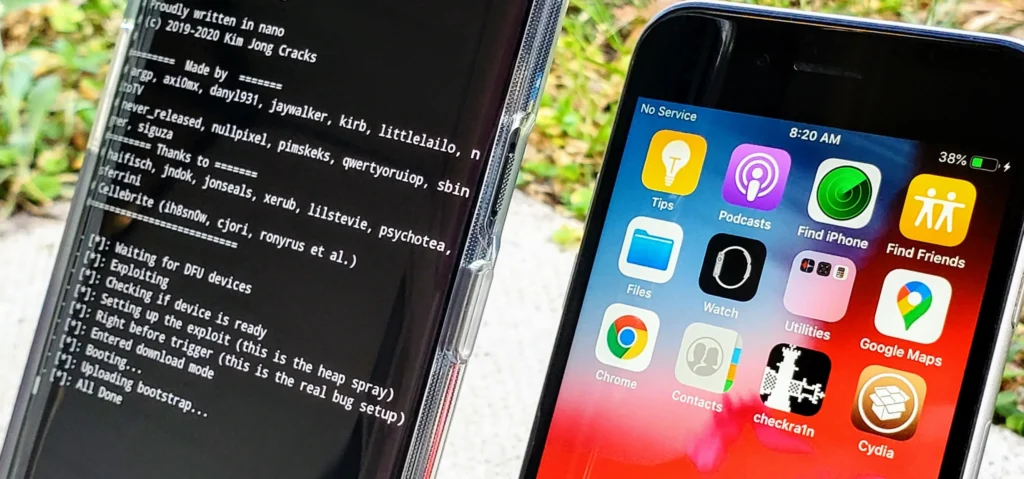
Checkra1n is one of the most famous iOS jailbreak tools ever created. It allows users to remove Apple’s software restrictions and gain deeper control over their iPhone or iPad. With Checkra1n, users can install unofficial apps, customize the system interface, and access the device’s root file system.
The jailbreak tool became widely known because it is based on a powerful hardware exploit called checkm8, which affects Apple devices using A5–A11 processors. Unlike most jailbreak vulnerabilities, this exploit cannot be patched by Apple through software updates.
In this comprehensive guide, we will explore what Checkra1n is, how it works, supported devices, benefits, risks, and how to use it safely.
What is Checkra1n?
Checkra1n is a semi-tethered jailbreak tool for iOS devices that uses the checkm8 bootrom exploit to gain low-level access to the system during the boot process.
In simple terms, jailbreaking removes Apple’s restrictions and allows users to:
- Install apps outside the App Store
- Customize the iOS interface
- Access system files
- Run unsigned code and tweaks
Normally, Apple locks down the operating system for security reasons. Jailbreaking bypasses those limitations and gives users full administrative (root) control over the device.
Because Checkra1n exploits the device hardware itself, Apple cannot completely fix it with normal software updates.
How Checkra1n Works
Checkra1n works by exploiting a bootrom vulnerability called checkm8.
Bootrom Exploit
The bootrom is the very first code executed when an iPhone starts. Since this code is stored in hardware, Apple cannot update it through software patches.
The checkm8 exploit allows attackers to run custom code during the early boot stage, enabling the jailbreak to load before iOS security protections are fully active.
Semi-Tethered Jailbreak
Checkra1n is considered semi-tethered. This means:
- If the device reboots, the jailbreak temporarily disappears.
- The user must reconnect the device to a computer and run Checkra1n again to re-enable the jailbreak.
However, all installed jailbreak apps and tweaks remain on the device.
Supported Devices
Checkra1n only works on devices vulnerable to the checkm8 exploit.
Supported iPhone Models
- iPhone 5s
- iPhone 6 / 6 Plus
- iPhone 6s / 6s Plus
- iPhone SE (1st generation)
- iPhone 7 / 7 Plus
- iPhone 8 / 8 Plus
- iPhone X
These devices contain A7–A11 processors, which are vulnerable to the exploit.
Unsupported Devices
Checkra1n does NOT work on newer iPhones, including:
- iPhone XR
- iPhone XS / XS Max
- iPhone 11 series
- iPhone 12 and later models
These devices use newer chips (A12 and above) that are not affected by the checkm8 vulnerability.
Supported iOS Versions
Checkra1n officially supports:
- iOS 12
- iOS 13
- iOS 14 (with some limitations)
Some community tools have extended compatibility to newer versions for certain devices, but official support mainly focuses on these versions.
Key Features of Checkra1n
1. Hardware-Based Exploit
Because it uses the bootrom vulnerability, the jailbreak is permanent for supported devices.
2. Root File System Access
Users can access the full iOS file system and modify internal system files.
3. Third-Party Package Managers
Checkra1n installs tools like:
- Cydia
- Zebra
- Sileo (via tweaks)
These package managers allow users to install jailbreak apps and modifications.
4. Advanced Developer Tools
Security researchers and developers use Checkra1n for:
- iOS security research
- penetration testing
- reverse engineering of apps.
Advantages of Using Checkra1n
1. Unlimited Customization
Users can customize iOS themes, icons, lock screens, and system animations.
2. Install Unofficial Apps
Apps not allowed by Apple can be installed.
3. Access Hidden System Features
Many advanced features hidden by Apple can be unlocked.
4. Research and Development
Cybersecurity professionals use jailbroken devices for mobile security testing.
Risks and Disadvantages
Although Checkra1n is powerful, it comes with several risks.
Security Vulnerabilities
Jailbreaking removes Apple’s security restrictions, which may expose the device to malware.
Warranty Issues
Apple does not support jailbroken devices, and warranty coverage may be affected.
System Instability
Some tweaks can cause crashes, battery drain, or performance issues.
Fake Jailbreak Scams
Some websites distribute fake Checkra1n downloads that install malicious profiles instead of jailbreaking the device.
Always download the tool from the official website.
Basic Steps to Use Checkra1n
Here is a simplified process for jailbreaking an iPhone using Checkra1n.
Step 1: Prepare Your Device
- Backup your iPhone
- Disable passcode and Face ID
- Install Checkra1n on macOS or Linux
Step 2: Connect Your Device
Connect your iPhone to the computer using a USB cable.
Step 3: Enter DFU Mode
Follow the instructions to place the device in Device Firmware Update (DFU) mode.
Step 4: Run the Jailbreak
The tool injects the exploit and boots the device into a jailbroken state.
Step 5: Install Cydia
Once the device restarts, the Checkra1n loader will appear, allowing you to install Cydia.
Is Checkra1n Still Relevant Today?
While Checkra1n was revolutionary, its usefulness today is limited because:
- Most modern iPhones use A12+ chips
- New jailbreak tools such as Palera1n support newer iOS versions
However, Checkra1n remains one of the most stable jailbreak tools ever developed, especially for older devices.
Frequently Asked Questions
Is Checkra1n safe?
It is generally safe if downloaded from official sources, but jailbreaking always carries risks.
Can Apple patch Checkra1n?
No. Because it uses a hardware exploit, Apple cannot fix it through normal iOS updates.
Does Checkra1n work on iPhone 11 or newer?
No. Only devices with A7–A11 chips are supported.
Does the jailbreak disappear after reboot?
Yes. You must run Checkra1n again after restarting the device.
Conclusion
Checkra1n remains one of the most influential jailbreak tools in the iOS ecosystem. By leveraging the powerful checkm8 bootrom exploit, it allows deep system access to older Apple devices and offers features that Apple normally restricts.
Although newer iPhones are no longer vulnerable to this exploit, Checkra1n continues to be widely used by developers, researchers, and jailbreak enthusiasts who want maximum control over their iOS devices.
0 Comments
Be the first to comment.