













Palera1n is one of the most important jailbreak tools in the modern iOS ecosystem. Developed for Apple devices running iOS 15 and later, it allows users to bypass Apple’s restrictions and gain deeper access to the operating system. With this access, users can install tweaks, modify system behavior, and run applications outside the Apple App Store.
Unlike many jailbreaks that rely on software vulnerabilities patched by Apple quickly, Palera1n is based on the checkm8 hardware exploit, which affects specific Apple chips and cannot be patched through software updates.
Because of this, Palera1n has become one of the most reliable jailbreak methods available for compatible devices, especially older iPhones and iPads.

Palera1n is a developer-oriented jailbreak tool designed for iOS and iPadOS devices. It enables root-level access to Apple’s operating system, allowing modifications that are normally impossible under Apple’s security model.
With Palera1n, users can:
- Install custom tweaks and themes
- Access the device file system
- Run third-party apps not approved by Apple
- Customize system UI and behavior
- Use advanced developer tools
The jailbreak typically installs package managers such as:
These act as app stores for jailbreak tweaks and modifications.
Key Features of Palera1n
1. Hardware-Based Jailbreak (checkm8 exploit)
Palera1n relies on the checkm8 bootrom exploit, a hardware vulnerability affecting certain Apple processors. Because this flaw exists at the hardware level, Apple cannot fully patch it via iOS updates.
Advantages:
- Long-term compatibility with new iOS updates
- Stable jailbreak environment
- Difficult for Apple to completely block
2. Rootless and Rootful Modes
Palera1n offers two jailbreak modes:
Rootless Jailbreak
- Recommended for most users
- Does not modify core system files
- Better compatibility with modern iOS security
Rootful Jailbreak
- Full root access to the operating system
- Allows deeper system modifications
- Mainly used by advanced developers
Users can select either option depending on their needs.
3. Package Manager Support
After jailbreaking, Palera1n installs Sileo or Zebra to manage tweaks.
These tools allow users to:
- Browse tweak repositories
- Install system modifications
- Update packages
- Manage installed tweaks
Sileo is generally recommended because of its speed and modern interface.
Supported Devices
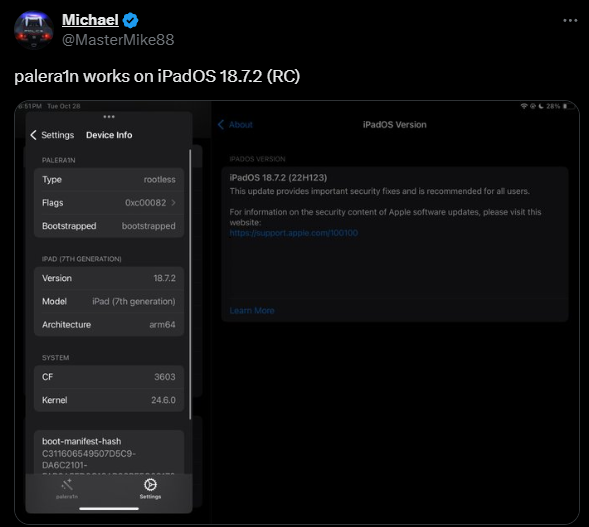
Palera1n mainly supports devices vulnerable to the checkm8 exploit.
Fully Supported Devices
- iPhone 5s → iPhone X
- iPad 5th generation → 7th generation
These devices use A8–A11 chips, which are permanently vulnerable to checkm8.
Unsupported Devices
Newer devices such as:
- iPhone XS
- iPhone 11
- iPhone 12
- iPhone 13
- iPhone 14+
use newer processors (A12 and later) that are not vulnerable to the exploit.
These devices require different jailbreak methods if available.
Supported iOS Versions
Palera1n works primarily with:
- iOS 15
- iOS 16
- Some builds of iOS 17 and later
Support depends on device chipset and jailbreak mode.
Because it is hardware-based, Palera1n often continues to work on new firmware versions for affected devices.
How Palera1n Jailbreak Works
The process generally follows these steps:
1. Install the Palera1n Tool
Download the jailbreak tool on:
- macOS
- Linux
- Windows (via specialized builds)
2. Enter DFU Mode
DFU (Device Firmware Update) mode allows the exploit to run before iOS boots.
3. Run the Jailbreak Command
The software executes commands that exploit the bootrom vulnerability.
4. Install the Loader
The Palera1n loader installs:
- Sileo
- Bootstrap environment
- tweak injection tools
5. Install Tweaks
Users can now install tweaks from repositories.
Advantages of Palera1n
1. Reliable Exploit
Because it uses checkm8, Apple cannot fully patch it through software updates.
2. Modern Rootless Architecture
Improves stability and compatibility with newer iOS versions.
3. Active Community
The jailbreak community continues to maintain repositories and tweaks.
4. Powerful Customization
Users can completely transform the iOS interface.
Risks of Using Palera1n
Despite its benefits, jailbreaking has risks.
1. Security Risks
Root access can expose the device to malware.
2. Device Instability
Tweaks may cause:
- boot loops
- crashes
- system instability
3. Warranty Issues
Apple may refuse warranty service for jailbroken devices.
4. OTA Updates Disabled
Over-the-air updates may stop working after jailbreak.
Popular Tweaks Used with Palera1n
Common jailbreak tweaks include:
- Filza File Manager
- CarBridge
- iCleaner Pro
- SnowBoard themes
- BioProtect
These tweaks allow system-level customization unavailable on stock iOS.
Palera1n vs Other Jailbreak Tools
| Feature | Palera1n | Dopamine | checkra1n |
|---|---|---|---|
| Exploit type | Hardware (checkm8) | Software | Hardware |
| Device support | A8–A11 | A12+ | A8–A11 |
| Rootless support | Yes | Yes | No |
| iOS compatibility | iOS 15+ | iOS 15–16 | iOS 12–14 |
Palera1n is considered the modern successor to checkra1n for newer iOS versions.
Future of Palera1n
The jailbreak community continues evolving.
Future improvements may include:
- Better rootless tweak compatibility
- GUI installers for easier jailbreak
- Improved support for newer iOS versions
However, jailbreak development has slowed in recent years due to Apple’s increasing security measures.
Conclusion
Palera1n remains one of the most powerful jailbreak tools available for compatible Apple devices. Thanks to the checkm8 hardware exploit, it provides a stable and long-lasting jailbreak solution for older iPhones and iPads.
While it enables deep customization, users should carefully weigh the benefits against the potential risks such as security vulnerabilities and system instability.
For developers, researchers, and advanced users, Palera1n continues to be an essential tool in the iOS modification ecosystem.
0 Comments
Be the first to comment.